


How Login to My Profile – Kerala PSC Thulasi Login
Before I’m describing how to login to Kerala PSC Thulasi website, let me clarify what is the pscthulasi website for those who don’t already didn’t know.www keralapsc thulasi con (www.thulasi.keralapsc.gov.in login)
What is Kerala PSC Thulasi Website?
Kerala PSC Thulasi is the official website of Kerala Public Service Commission for registering for the Kerala government jobs. In the Thulasi website, if you have already done the One Time Registration, you can apply for the examinations that satisfy your educational, age, cast etc. qualifications when Kerala PSC announces notifications. Now, here is how to login to my profile in pscthulasi website.How to find upcoming Kerala PSC exams?
Kerala PSC announces the official exam notifications in their official Kerala PSC website. For the users PSCNET android app and website you can find notifications in our Kerala PSC Notification page. We updated this very regularly you just need to bookmark page and check regularly.Steps: Login to PSC Thulasi Website Profile – Kerala PSC Login Logout
Step 1: Open the Kerala PSC Thulasi website in your web browser. https://thulasi.psc.kerala.gov.in/thulasi/ Step 2: Enter your User ID, Password, and Access code given in the login form.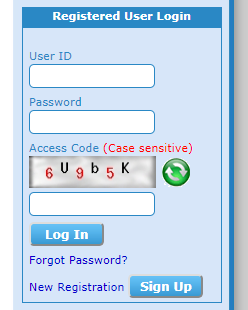
login to my profile – PSC Thulasi Login
If you can’t read the Access code given in the box, you can regenerate the code by clicking on the refresh icon.
Jancy Mary philipose
My pcs profile
ASHRITH SOMASUNDARN
Ok
ASHRITH
Ok
Amrithaaravindn
Enik enta password oormayilla
Shali.L
I like
ARUMUGHAN P
HAI FRIENDS